
Guide
Bluetooth hearing aids explained: streaming, TV and phone calls
Published 20 August 2026 · 8 min read
Bluetooth is now the feature people ask about most when they come in to discuss hearing aids — usually because they want phone calls and the television to be easier, not because they are interested in the technology itself. This guide explains what Bluetooth actually does inside a hearing aid, the two competing standards, and how the six major manufacturers compare.
The short answer
Bluetooth hearing aids stream sound straight from your phone, tablet or television into both ears, so calls, music and TV arrive without a headset. Nearly every current private hearing aid has it. The main difference between brands is whether they use Made for iPhone and Android ASHA, or newer universal Bluetooth (LE Audio and Auracast) that works with almost any device.
Book a hearing assessmentWhat Bluetooth in a hearing aid actually does
A conventional hearing aid picks up sound with its own microphones, processes it, and delivers it to your ear. Bluetooth adds a second route in: audio can arrive as a digital signal from another device and bypass the microphones entirely. In practice that means:
- Phone calls in both ears. The single biggest gain. Hearing a caller in two ears instead of one against a handset makes a substantial difference to clarity, particularly on a poor line.
- Television at your own volume. A small TV streamer sends the programme straight to your aids, so the rest of the room keeps the volume they want.
- Music, podcasts and audiobooks without headphones over the top of the devices.
- A remote microphone. A clip-on microphone worn by a companion transmits their voice directly to you across a restaurant table or lecture hall — often the most useful accessory of all.
- App control. Volume, programmes, bass and treble, and a "find my hearing aid" locator.
- Remote fine-tuning. Adjustments made by your audiologist and sent to the devices without you travelling in.
The two kinds of Bluetooth worth knowing about
Hearing aids are tiny and run on very little power, so for years they could not use ordinary Bluetooth in the way a pair of headphones does. Two approaches emerged.
Made for iPhone and Android ASHA. These are low-energy protocols built specifically for hearing aids. They work beautifully with an iPhone, and with recent Android phones that support ASHA. The catch is what happens on the way out: with some combinations you can hear the caller through the aids but must still speak into the phone, and older or less common Android handsets may not be supported at all.
Universal Bluetooth and LE Audio. Newer devices — Phonak's Audéo Sphere Infinio being the clearest example — use standard Bluetooth, so they pair with anything: any phone, a laptop, a tablet, a hotel television. LE Audio is the newest generation, and it brings Auracast, which lets a venue broadcast audio that any compatible hearing aid nearby can tune into. Theatres, airports, stations and lecture halls are gradually rolling this out as a replacement for the old hearing loop.
If you own an iPhone and mostly want calls and TV, either approach serves you well. If you use Android, switch between devices, or want the longest useful life from a five-year purchase, universal Bluetooth and Auracast readiness are worth prioritising.
How the main brands compare
Below is how the six major manufacturers stand on connectivity in 2026. Every one of them makes good hearing aids; these are differences of approach, not of quality. Note that connectivity varies between models within a brand — a premium device and an entry-level device from the same manufacturer often do not share the same streaming features.
Phonak
- Streaming standard:
- Universal Bluetooth Classic + LE Audio
- Hands-free calls:
- Hands-free on iPhone and Android
- TV:
- TV Connector (included with most packages)
The most device-agnostic option — pairs with laptops, tablets, older phones and anything else with Bluetooth.
Starkey
- Streaming standard:
- Made for iPhone, Android ASHA, LE Audio on newer models
- Hands-free calls:
- Hands-free on iPhone; varies on Android
- TV:
- TV streamer accessory
Strong app ecosystem with health and fall-detection features alongside streaming.
GN ReSound
- Streaming standard:
- Made for iPhone, Android ASHA, Auracast-ready on Nexia and Vivia
- Hands-free calls:
- Hands-free on iPhone; hands-free on newer Android
- TV:
- TV Streamer 2 accessory
Among the earliest to ship Auracast-ready hardware; natural spatial sound is the house strength.
Oticon
- Streaming standard:
- Made for iPhone, Android ASHA, LE Audio on Intent
- Hands-free calls:
- Hands-free on iPhone; limited on older Android
- TV:
- TV Adapter 3.0
Well-regarded processing; connectivity has historically trailed Phonak on Android calls.
Widex
- Streaming standard:
- Made for iPhone, Android ASHA, LE Audio on Allure
- Hands-free calls:
- Hands-free on iPhone; varies on Android
- TV:
- TV Play accessory
Favoured by musicians for natural sound; the streaming feature set is competent rather than class-leading.
Signia
- Streaming standard:
- Bluetooth Classic on some models, Made for iPhone, ASHA
- Hands-free calls:
- Hands-free on iPhone and many Android phones
- TV:
- StreamLine TV accessory
Several models support hands-free calling on both platforms without an intermediary device.
For a wider look at sound quality, styles and price rather than connectivity alone, see our 2026 brand comparison.
What setting them up actually involves
Pairing is done at the fitting appointment, not left to you to work out at home. The sequence is short:
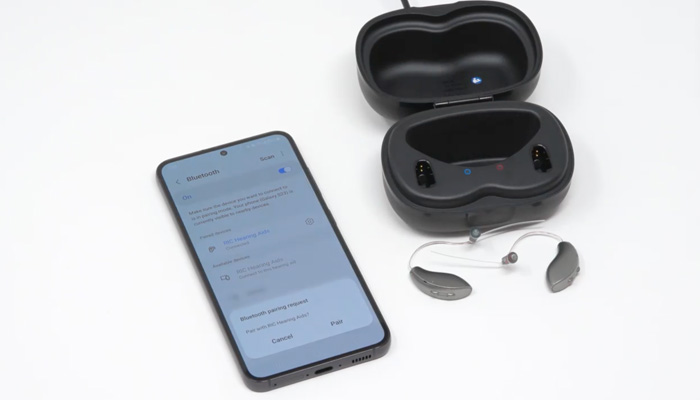
- Download the manufacturer's app and pair the aids from the phone's accessibility or Bluetooth settings — usually by opening and closing the battery doors, or placing the devices back in the charger.
- Test a call and a piece of music, and set the streaming volume balance so speech through the microphones is still audible while you are on a call.
- Plug the TV streamer into the television's optical output and pair it once. From then on it connects automatically when you switch the television on.
- If one aid ever drops out, the reliable fix is to turn Bluetooth off and on again on the phone, then restart the hearing aids. A full re-pair is rarely needed.
Our troubleshooting guide covers connection problems in more detail, and learn about your hearing aids walks through daily use.
Not sure which will work with your phone?
Bring your phone to the appointment. Pairing is tested in clinic before you commit, and if a particular combination doesn't behave, we will tell you before you buy rather than after.
The honest drawbacks
- Battery. Heavy streaming shortens a day's charge by a few hours. For most people a rechargeable device still comfortably lasts from morning to bedtime.
- Occasional dropouts. Bluetooth is Bluetooth — in crowded radio environments such as a train platform, a brief interruption is normal.
- Phone updates. A major iOS or Android update occasionally disrupts pairing until the manufacturer catches up.
- Size. The very smallest invisible-in-canal devices often cannot carry a Bluetooth antenna. If discretion matters more than streaming, that is a genuine trade-off to weigh up.
Who gets the most from it
Streaming earns its keep for people who are on the phone a great deal, people who watch television with a partner who prefers it quieter, and anyone who has found earphones uncomfortable or impossible over hearing aids. If your listening life is quiet and largely face-to-face, Bluetooth is a pleasant extra rather than a reason to move up a technology tier — and the money is often better spent on the processing that helps in noise. Our guide to AI hearing aids covers that side, and the UK cost guide explains what each tier includes.
Whichever you choose, the first weeks matter more than the spec sheet — getting used to hearing aids sets out what to expect.
What to check before you buy
- That your own phone — not a demonstration model — pairs and makes a hands-free call.
- Whether the TV streamer is included in the price or sold separately.
- Whether the clinic offers remote fine-tuning through the app.
- Whether the device is Auracast-ready, if you expect to keep it five years.
- What the warranty covers if an accessory fails. Our published price list sets out what each package includes.
Frequently asked questions
- Do all hearing aids have Bluetooth?
- No, but almost all current private hearing aids do. Bluetooth is standard across the premium and mid-range ranges from every major manufacturer in 2026. Entry-level devices, very small invisible-in-canal styles and older stock may not have it, because there is not always room for the antenna and the extra power draw inside a tiny shell.
- Can you get Bluetooth hearing aids on the NHS?
- Some NHS services now fit hearing aids with Bluetooth streaming, but it varies by trust and by the contract that trust holds with a manufacturer. Where it is available it is usually limited to streaming from a compatible phone rather than the full range of accessories and app features found on private devices. It is worth asking your local service directly.
- Do Bluetooth hearing aids use more battery?
- Yes, streaming uses noticeably more power than ordinary listening — typically a reduction of a few hours from a full day of wear if you stream heavily. On modern rechargeable devices this rarely matters in practice: a full charge still covers a normal day including several hours of calls, TV or music.
- Can I connect my hearing aids to my TV?
- Yes. Most manufacturers sell a small TV streamer that plugs into the television's optical or audio output and sends sound straight to your hearing aids, so you can set your own volume without changing the volume for everyone else in the room. Newer televisions with Auracast can send audio to compatible hearing aids without any extra hardware.
- Are Bluetooth hearing aids safe?
- Yes. Bluetooth is a very low-power radio transmission — far weaker than a mobile phone — and it is non-ionising, so it does not carry the risks associated with radiation such as X-rays. There is no evidence of harm from wearing Bluetooth hearing aids.
- Can I use Bluetooth hearing aids with both an iPhone and an Android phone?
- It depends on the device. Made for iPhone hearing aids stream fully to iPhones and to newer Android phones that support ASHA, but hands-free calling on Android is often limited. Hearing aids with universal Bluetooth, such as the Phonak Audéo Sphere Infinio, connect to essentially any Bluetooth device — phone, tablet, laptop — and handle calls hands-free on both platforms.
Try the connectivity before you commit
Every appointment is with Scott Drummond himself, from assessment through to aftercare. Bring your phone and your questions — pairing, TV streaming and app control are all demonstrated in clinic, and a 60-day trial means the decision is reversible.
We see patients from Kensington, Chelsea and Knightsbridge, plus every area we cover. Read our reviews of Starkey Edge AI, Phonak Eon and Oticon Intent.
Book a hearing assessmentManufacturer feature details are correct at the time of publication and vary by model and firmware version. This article is general information and is not a substitute for individual medical advice.